Technical Specifications
Format: .rbxm (Roblox Model)
Version: v1.0.0
Category: Roblox Assets
Compatibility: R6, R15 & Studio
HttpService: Required
Licensing: Roblox Profile & Group Binding
ROBLOX ASSET
In-Game Staff Call & Report System
£2.99
One-time purchase • Direct download
Secure Stripe checkout
Product Description
Equip your Roblox game with a professional, automated player reporting and moderation suite.
✨ Key Features:
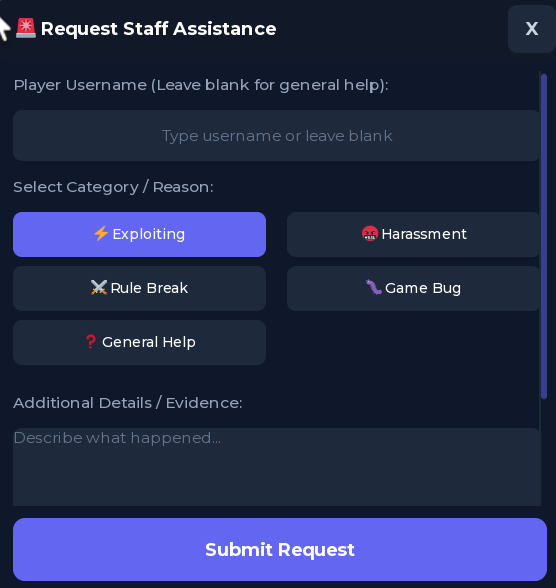
• Complete In-Game Report GUI: Sleek, responsive, and draggable dark-mode modal for players to report exploiters, toxic behavior, rule violations, or request general assistance.
• Real-Time Staff Toast Alerts: Online staff members (verified via Roblox Group Rank, User ID, or GamePass) receive instant animated slide-in popup banners with notification sound effects.
• 1-Click Teleportation: Staff can click the "Teleport" button on any incoming ticket to jump directly to the reported player or reporter.
• Smooth Draggable Window: Players can drag the report modal by the top bar to place it anywhere on their screen.
• Anti-Spam Protection: Customizable per-player cooldown timers prevent ticket spamming.
• Optional Discord Webhook Logging: Automatically logs rich embeds with reporter details, reported player, reason, and Server Job ID directly into your staff Discord channel.
• Fully Dynamic & Responsive: Automatically scales cleanly across Mobile, Tablet, 1080p, and 4K displays.
⚙️ Setup Instructions:
1. Place the StaffCallSystem folder into ServerScriptService.
2. Place the StaffCallClient LocalScript into StarterGui.
3. Open the Configuration ModuleScript to set your Roblox Group ID, minimum staff rank, or Discord webhook URL.
4. Done! Your game now has an automated moderation system.